telegram-cli: Give Your Agent Your Telegram
Install one skill by prompting your agent once, then ask for Telegram jobs in plain language.
Dzianis Vashchuk
3 min read
I run several bots on Telegram: a Muse bot, a Grok bot, Dots, and OpenClaw bots for my team. Testing them by hand meant opening the Telegram app, typing a prompt, waiting, and screenshotting the reply. Reading a long chat meant scrolling it myself. Before this skill, every bot change ended with me playing tester on my phone.
So I wrote telegram-cli, a skill in my dzianisv/skills repo. It gives my agent access to Telegram through my personal user account. I ask for a job in plain language. The agent does the typing, waits for replies, and brings back the result.
Install: prompt your agent
You never run the CLI yourself. You send one prompt to the agent you already use:
Install the telegram-cli skill: run
npx -y skills add dzianisv/skills -s telegram-cli -g. Then log in to Telegram with my account and confirm when you are in.
The agent runs the install in its own environment and installs Telethon itself if the package is missing. Your part takes under a minute: give your phone number and type the login code Telegram sends you. That login happens once, and the saved session covers every later job.
Send the same prompt in a Muse chat, a Grok Bot chat, Dots, or an OpenClaw agent chat. It works with any agent that can run shell commands in its own environment. If you run a second Telegram account, tell the agent which profile to use; profiles are separate sessions, selected with TELEGRAM_CLI_PROFILE.
The raw command, for anyone who prefers the terminal:
npx -y skills add dzianisv/skills -s telegram-cli -g
Jobs I ask for
After that one setup, every job is a sentence. The pattern is the same each time. I name the chat or the bot, say what I want back, and let the agent pick the command. I never type a flag, a path, or a session setting.
Summarize a chat.
Read my last 50 messages with @SomeBot and summarize: decisions, open questions, anything waiting on me.
Underneath, that is one read call with a limit of 50.
Test two bots.
Ask the Muse bot and the Grok bot the same question, wait for both replies, and show me the exact answers side by side.
Swap in Dots for either bot and the prompt stays the same. Each test is an ask: send, wait for the reply, capture it.
Send a file.
Send this report PDF to @SomeBot with the caption "Latest".
send-file carries the attachment and the caption.
Voice notes.
Download my recent voice notes from @SomeBot and tell me what each one asks for.
get-voice saves the recent voice messages, and the agent transcribes and summarizes them.
Pair an OpenClaw bot.
Pair with @MonicaHallBot: message it /start, approve the pairing code on the monica-hall account, then verify it answers as the right agent.
This one comes from a real pairing on my team setup. The bot answered as the agent bound to the monica-hall account, which is how I knew the pairing had landed on the right account.
Scheduling a task
Recurring jobs are also one sentence:
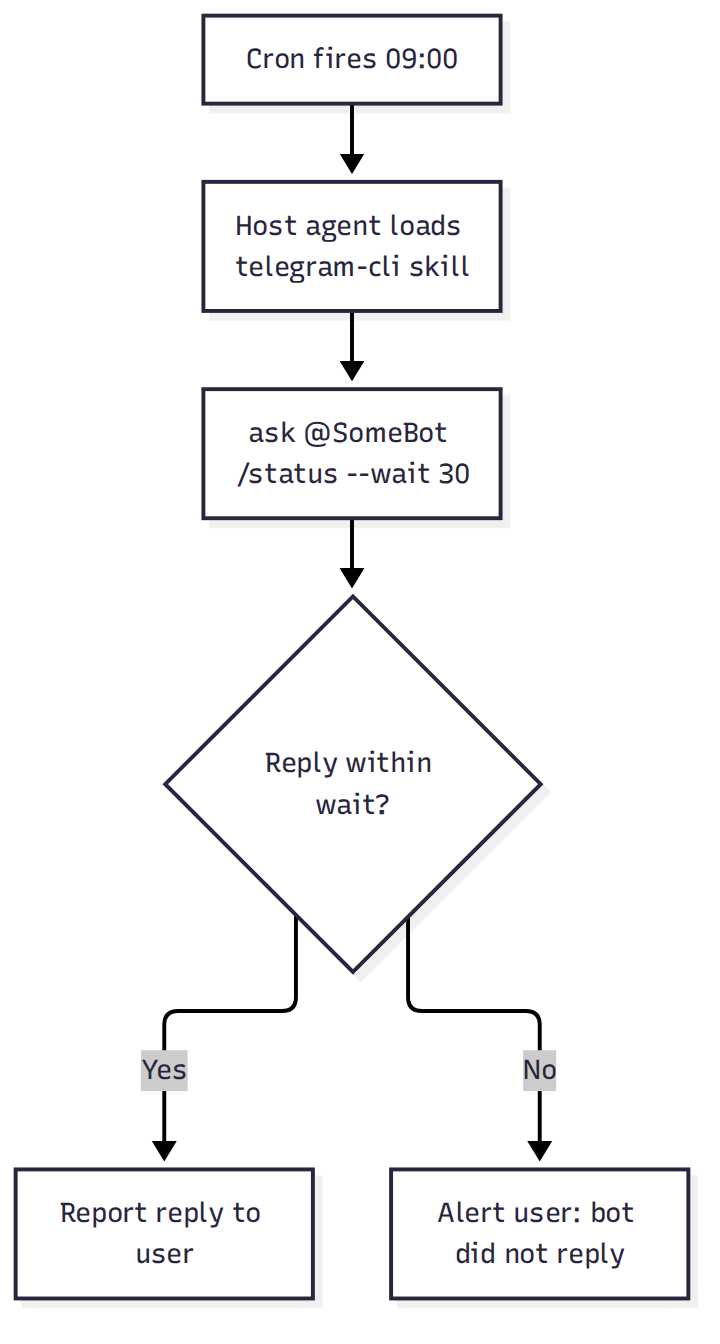
Every day at 09:00, ask @SomeBot for its /status, report the reply, and alert me if it does not answer.
telegram-cli has no scheduler built in. The host agent's cron fires at 09:00, loads the skill, and runs the check. A reply lands in my chat as a report. Silence from the bot lands as an alert, which is the part that makes the check worth scheduling. I use it for bot health checks and for a morning read on chats I follow.
Under the hood
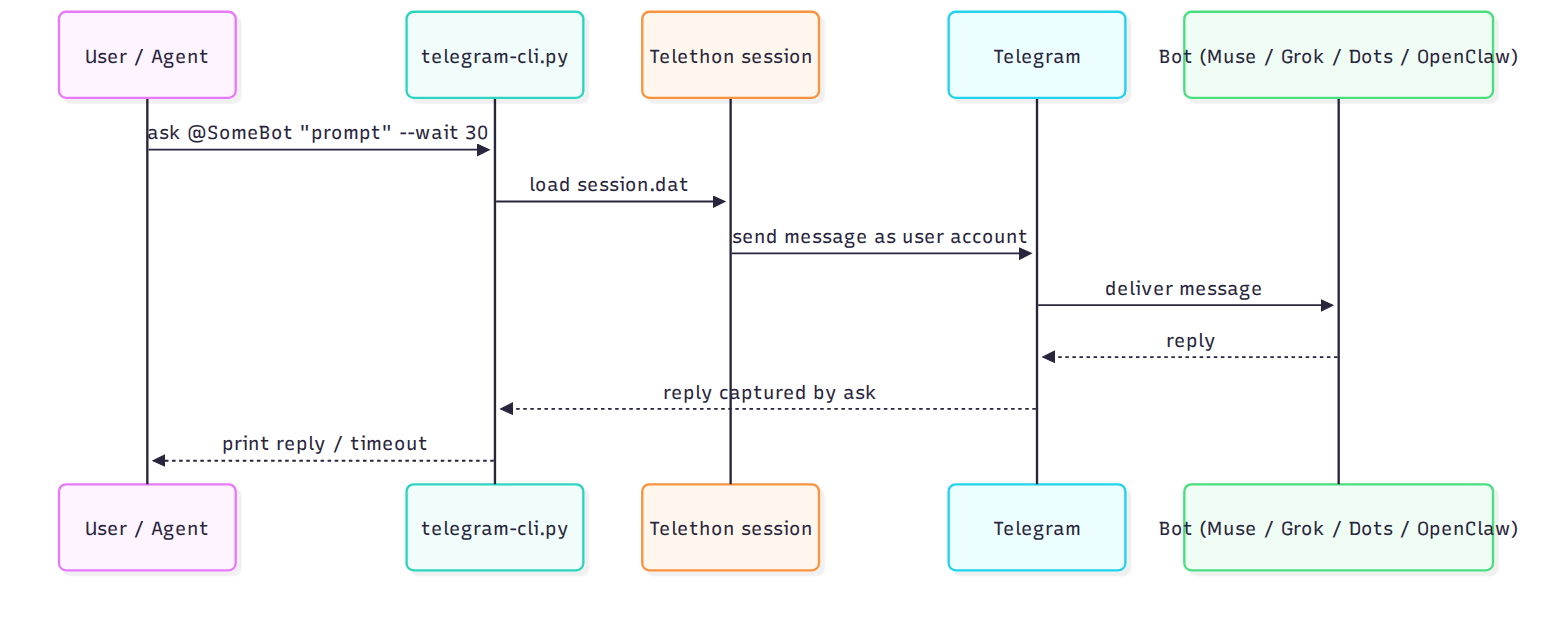
The skill ships one Python script, telegram-cli.py, built on Telethon. It logs in as my user account and keeps the session on disk, so the agent acts as me in chats where a bot account has no access. The commands are small:
python3 "{baseDir}/telegram-cli.py" login
python3 "{baseDir}/telegram-cli.py" read @SomeBot --limit 10
python3 "{baseDir}/telegram-cli.py" ask @SomeBot "ping" --wait 30
python3 "{baseDir}/telegram-cli.py" send-file @SomeBot ./report.pdf --caption "Latest"
python3 "{baseDir}/telegram-cli.py" get-voice @SomeBot --limit 3
ask waits 30 seconds by default and returns the reply text, which is why the smoke tests above need no polling. Voice notes go out as .ogg Opus files, the format Telegram renders as a voice note.
Try it
The skill and the script are in dzianisv/skills. If you want OpenClaw deployed for your team, that is what we do at agentpod.agentlabs.cc.